Thursday, February 18, 2010
HandyBirthdays v0.11 C Sync Brithdays With Calendar And Contact
Wee Wheel v1.9 S60v3 S60v5 FOR U Remote Joystick Emulation With An Acceleromenter
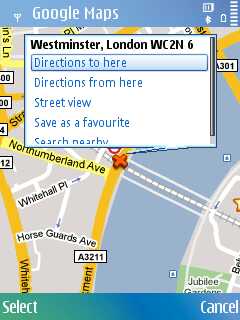
Google Maps for Symbian S60 update to v3.2.0
Use Google Maps on your phone, and never carry a paper map again.If you don't have a map app on your smartphone, download Google Maps.Google Maps for Mobile is the mobile version of the popular Google Maps. free download - Google maps for Symbian s60.Get maps, directions, local information, and more all in your pocket for free with Google Maps for mobile.

ENJOY GOOGLE MAPS Google Maps for Symbian S60 devices got recently updated to v3.2.0. New in this version is support for Wikipedia and “Layers” feature, allowing information on top of the maps.
Compass application - Nokia N97 and Samsung i8910 HD
your Nokia N97 or Samsung i8910 HD as a compass and find your way! A built-in magnetometer and GPS provide the following functionality: direction in degrees, traditional compass and longitude/latitude coordinates. This application is for Nokia N97 and Samsung i8910 HD only.
As you all know compass is a handy navigational instrument which is used to identify the direction in any place. Thought compass is not useful in day to day life sometimes we find it useful while on adventurous trips, forest camps etc. In such cases, we may find it difficult to locate the path if we don’t have a compass. Here is one handy compass tool for Java based mobile phones.
Compass for J2ME works on all mobile phones with Java support. Most of the popular mobile phones and almost all latest handsets from Nokia, Sony Ericsson, LG, Blackberry, HTC, Motorola, Samsung and any other java enabled phones are supported. Impressive fact about this application is that it does not require any GPRS connection to work which makes it a really mobile application even if you are out of network.
This tool is totally based on scientific / astronomical calculations and shows accurate directions based on the location, date, time, position of sun / moon. It is quite difficult to use this tool during afternoon hours as you cannot properly point out to the direction of sun.
Let us see how to configure and get the exact NS directions with this mobile compass tool.
1. Location: If you know the exact airport code of your nearest airport, you may use that. You may also enter the latitude / longitude. If you are not clear on that, a random placement of location by moving your arrows will work as the time zone is usually one per country.
2. Time Zone: After you enter the location, you will be asked with time zones based on location. This one should be entered correctly as you know the right one. Each time using the application there is a need to calibrate the digital compass. Actually it does matter which application you are using the digial compass needs to be calibrate each time. The calibration is done according to the following diagram, waving the Nokia E72 and “drawing” the infinity symbol in the air.
OR
Bright Light Touch 1.01 - Use Your Nokia 5800 Flash As Torch / Flashlight
Device Info 2 Widgets

DeviceInfo widget for Nokia 5800 XpressMusic and the N97 is the first widget release by moubail.com. The widget is based on script samples found at Forum Nokia Wiki. The widget is pure HTML/CSS/Javascript and is released as an example to motivate other users to create a widget of their own. What does it do then? The DeviceInfo widget displays more or less essential data about the device it’s running on. It’s a handy way to digg up the phone’s IMEI code, wireless MAC address and the current firmware version. This release is BETA and has been tested only the Nokia 5800. There is an update system built-in meaning you should be able to update it easily to a newer version – should we ever make one. Post your ideas and wishes or get in touch through the Feedback -page. If you have a widget you would like to publish or need some graphics work done on it or anything like that – moubail.com might be able to help.INSTALLINGYou can1. Download the widget straight to your phone and install it when prompted2. Download the widget to your computer and email it to your phone3. Install it by using the Ovi SuiteFEATURESWith this widget you can display* Graphical display for storage and RAM space (NEW!)* Graphical display for battery status (NEW!)* IMEI code* WLAN Mac Address* Phone model* Firmware version* Manufacturer* Product type* Bluetooth status* Vibration status* Autolock status* Autolock timeout* Screensaver timeoutOTHER* Check for updates for the widgetFUTURE IDEAS* Toggle vibration* Toggle bluetooth (if possible with the API) (can’t be done)* Display installed applications* Graphical display of the memory statusVERSION HISTORY* 13.7.2009 – Version 2.0
Wednesday, February 17, 2010
iSearch – a web search launcher for S60 5th Edition

The iSearch widget is inspired by Russell Beattie’s Q Search widget. Russell made his with 30 lines of code – I used a bit more. iSearch widget has a touch friendly UI and there are currently 8 search options/engines to choose from. The widget is free but if you like it please consider making a donation.WHAT DOES IT DO AND HOW?iSearch speeds up the task of searching for stuff on the mighty Internet. Type a word to search for and click the service of your choice and the widget launches the phone’s browser and loads the result. The widget remembers the last thing that you searched for and displays it in the text box when you start the widget next time.TIP! To make searching even faster you can set one of the services as default so that when you hit the ‘Enter’ key on the keyboard the widget launches the search right away. You set the default by clicking the ‘Enter’ symbol on the right end of the buttons.FEATURESQuickly launch searches for* web sites google, bing* images google, flickr* video youtube* tweets twitter* facts wikipedia* dictionary definr* more services will be added according to users wishesOther* N97 homescreen support – just a big button, a limitation of the homescreen* remembers the last search* user definable default serviceINSTALLINGYou can1. Download the widget straight to your phone and install it when prompted2. Download the widget to your computer and email it to your phone3. Install it by using the Ovi SuiteVERSION HISTORY* 28.7.2009 – Version 1.0
Endomondo Tracker v1.0.1 S60v5

Endomondo is where you keep track of your sports activities, challenge your friends, and follow them live while they are workingout.You can track your activities with most GPS mobile phones or a Garmin device, or you can choose to enter your workouts manually.Endomondo can be used for all distance based sports - running, biking, hiking and kayaking are just a few examples.Endomondo is free!Sign up and get ready to free your endorphins!
Geko New Cal v.3.1.3800

Requirements: WM5-6.5Overview: Pick your dates and share them! Get rid of your old stylus and have fun with the picker!Smart user interfaceGekoNewCal is finger friendly!GekoNewCal 3.1 is designed to achieve the best level of ergonomics and ease of use. All the functions are accessible without using the stylus; the interface is simple and intuitive; the time scheduling is done by using the kinetic picker.Personalization of datesGekoNewCal is full optional!GekoNewCal allows you to set a category to your date and to customize your list of categories. You can fix "all-day" events, recurrences and set the alarm.Invitation over SMSGekoNewCal is social oriented!With GekoNewCal you can forward your invitation via SMS. You can invite your friends or colleagues simply by selecting their name from the contact list in your smartphone; they will accept or decline and the date will be automatically created in their agenda. You will receive a reply notification. (This option is possible only if GekoNewCal is installed also in the addressee's smarphone).Fitting for different screen resolutionsGekoNewCal is self adaptable!GekoNewCal now supports the following screen resolutions: QVGA, WQVGA, VGA, WVGA in "portrait" mode. The program automatically adapts the graphic to your screen resolution.Open to new skinsGekoNewCal is as you like!GekoNewCal supports your graphical skins. You can personalize the look of the program as you want.Support of unlimited languagesGekoNewCal is worldwide!GekoNewCal is delivered with the following languages: English, Spanish, French, German, Italian, Russian, Dutch, Norwegian, Swedish, Greek, Czech, Danish, Polish, Ukrainian, Romanian, Chinese (traditional and simplified), Japanese. You can add any other language simply by uploading a resource file with the translation.Chanhelog 3.1.3800• [NEW] New setting file for each skin to customize colors.• [NEW] New exit-button on mainscreen for a better ease of use.• [NEW] Optical touch response in all buttons.• [NEW] After saving and returning to main screen all items are resetted by default.• [NEW] Note window: keyboard is automatically displayed when tapping in the text area.• [FIXED] Minor visualization issues solved (navigation bar in option pages and in contact list, SMS invitation client).
Pocket pc info - devices and information + apps